Answer any question & generate striking images with AI. Real-time data from X.

Grok APK Download – AI Assistant
| Name | Grok - AI Assistant |
|---|---|
| Publisher | xAI |
| Genre | Productivity |
| Size | 10.3 MB |
| Version | 1.1.63-release.00 |
| MOD Info | Original |
| Get it On |

|
MOD Info
Original
What's new
Grok is an AI-powered assistant, developed by xAI, designed to be maximally truthful, useful, and curious.


Grok APK Download for Android and explore an AI-powered chatbot with smart conversations, quick responses, and productivity features. Learn installation steps, features, and safety tips.
You’ve probably noticed that AI apps are popping up everywhere lately, and Grok is one of those names making the rounds. It’s an advanced conversational AI assistant, made for people who want straight answers, friendly chats, and handy help right from their phone.
But before you jump in, take a minute to see what Grok actually does, how it runs on Android, and whether it’s worth your time.
This guide covers features, real-world usability, installation, and important safety stuff.

So, What’s Grok All About?
Grok does one thing pretty well—it’s an AI chatbot built for conversation. Ask questions, get help with tasks, or just chat and see where the conversation goes. You don’t get a list of links like a search engine; Grok shoots back direct answers in plain English.
People use it for all sorts of things:
General information
Writing help
Productivity tips
Tech questions
Everyday stuff
Basically, if you want quick info and an interactive sidekick that lives on your phone, Grok’s in that lane.
First Thoughts After Installing
It’s hard not to notice Grok’s slick, simple interface. No clutter, no weird menus, just straightforward. Whether you’re new to AI apps or not, you won’t get lost in the layout.
The APK installation isn’t complicated either. The file isn’t huge, and it goes on fast—as long as your phone isn’t ancient.
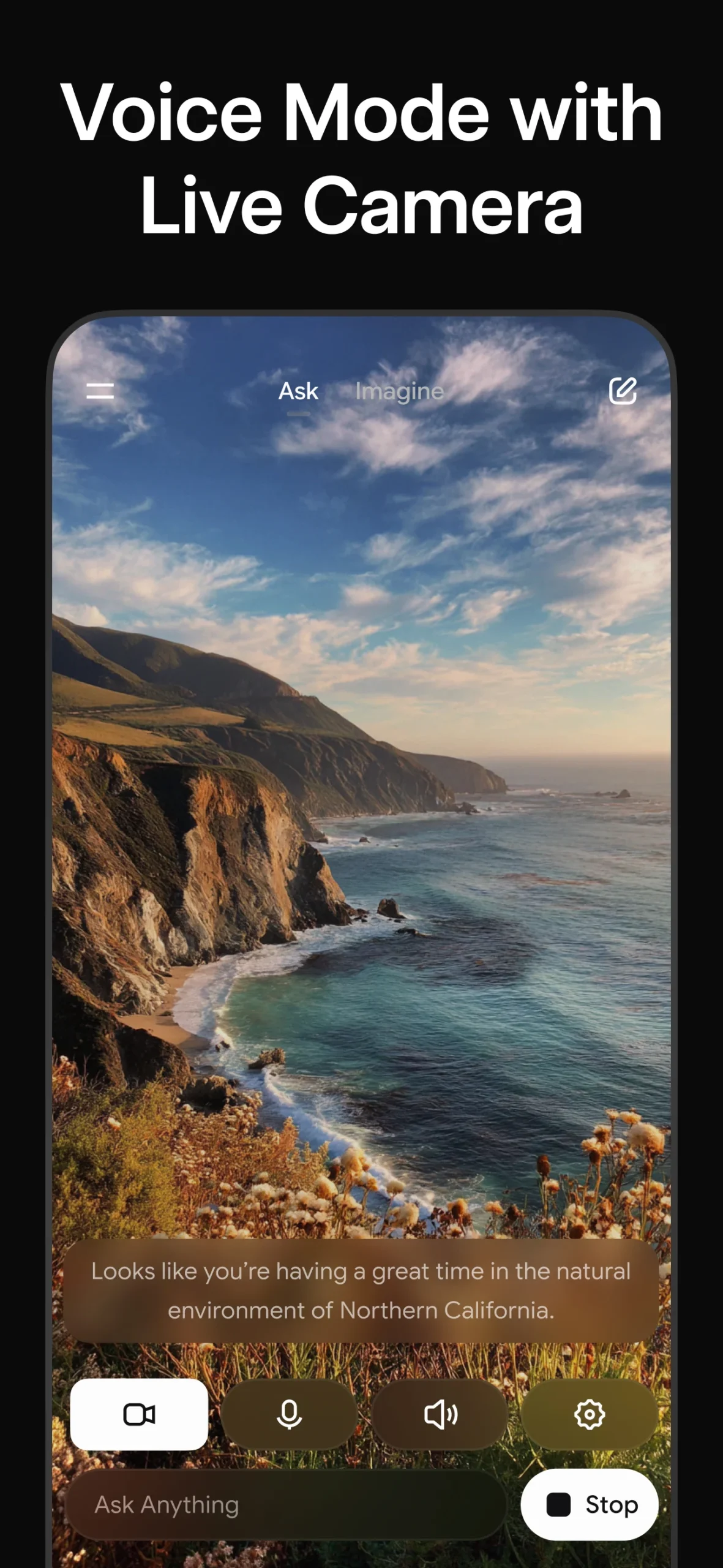
Open the app, and the chatbot window looks familiar. Responses pop up quickly, and the whole experience feels smooth.
How Does Grok Actually Run?
On Android, Grok feels light. You won’t see big delays, even if your phone isn’t the latest model. Use it for quick questions—it handles simple stuff really well—and the interface stays responsive no matter what you throw at it.
If you need help with brainstorming, writing, or summarising, Grok jumps in and makes it easy. The real standout is how conversational it feels compared to regular search engines. You just ask, and Grok answers right in the chat—no manual digging for info.
Of course, it’s not magic. Sometimes answers repeat or aren’t super detailed, especially if you’re asking technical stuff.
Features That Actually Matter
Now, here’s what actually sets Grok apart:
Speed
The responses come fast, so you don’t feel like you’re waiting around.
Simple Interface
Everything stays clean and uncluttered. You can focus on your convo, not figuring out settings.
Lightweight Performance
It doesn’t weigh down your phone, so even budget devices keep up.
Versatile Use
Use it for learning, entertainment, quick research, writing tips, everyday questions—whatever’s on your mind.
Device Compatibility
Older Android versions might not play nice with the latest updates.
But honestly, those are issues with almost every AI chatbot out there.
How to Install the Grok APK
If you want the APK version, it’s not complicated:
Download Grok APK from a trusted site like Androidports.com
Open Android settings and allow “Install Unknown Apps”
Find that APK file
Tap to install
Open Grok when it’s ready
The whole thing takes just a couple of minutes.
Is the APK safe?
This is a big deal. APK files are fine—if you stick to legit sources. Random sites sometimes sneak in malware or shady versions. Protect yourself:
Don’t use cracked or modded APKs
Look at app permissions—don’t just click “yes”
Use antivirus if you have it
Always go with reputable APK places like Androidports.com
Performance Across Different Devices
The good news: Grok works on most Androids. You don’t need a monster phone.
As long as your device has Android 8 or up, and at least 2GB RAM, you should be good. Mid-range and newer budget phones do fine, and tablets with steady Internet keep up too.
Who Actually Benefits Most?
Grok’s best for people who:
Like chatting with AI instead of traditional searching
Need quick info, writing, or brainstorming help
Want a straight-talking assistant that’s easy to use
It won’t replace deep research tools, but as an everyday helper, it’s solid.
Grok offers a smart, easy-to-use chatbot experience that’s quick on Android and doesn’t make your head spin with extra features. The APK route is nice for folks who like sideloading apps or can’t hit the Play Store.
Just remember: only download from trusted sources. Dodging malware is way easier than fixing it.
If you’re after a conversational AI that keeps things simple and fast, Grok’s definitely worth checking out—especially if you’re tired of digging through search results and want answers right in a chat.
Download Grok - AI Assistant
Download (10.3 MB)You are now ready to download Grok - AI Assistant for free. Here are some notes:
- Please read our MOD Info and installation instructions carefully for the game & app to work properly
- Read the FAQ carefully for more details
4.6/5 (3,087,142 votes)






Leave a Comment